Clinic or beauty studio administrator: what an AI agent takes
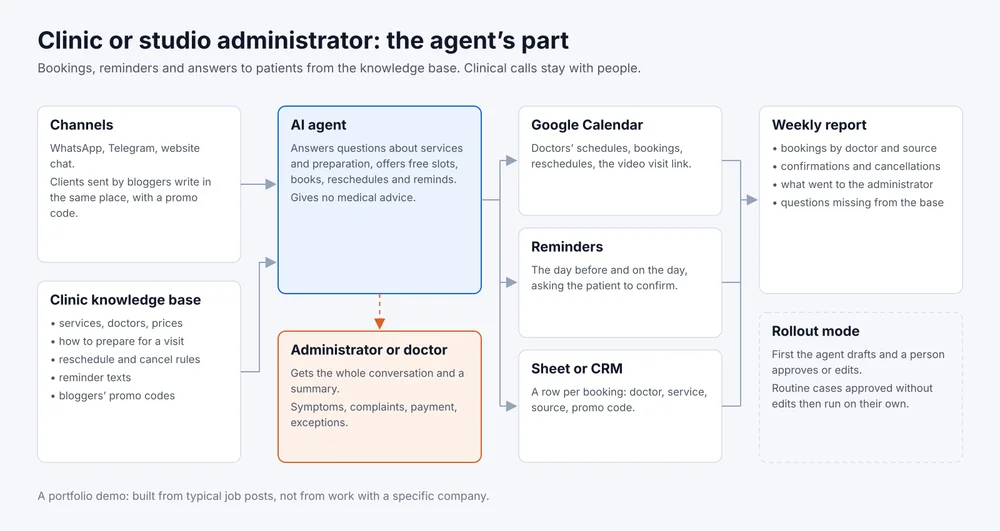
A typical administrator job post: the doctors' calendar, visit reminders, matching doctors' and patients' time, messenger replies and spreadsheets. The agent takes the repetitive part of that work, and the administrator or doctor keeps everything that needs a decision.
- Channels
- WhatsApp, Telegram, website chat
- Tools
- Google Calendar, Sheets, CRM
- Goes to a person
- Clinical questions, complaints, payment, exceptions
- Rollout
- Drafts for approval first
A portfolio demo. The scenario is built from typical job posts for an administrator at an online preventive medicine clinic and at a laser hair removal studio, not from work with a specific company. The dialogue below is written as a sample.
What the job post usually asks for
- keep the doctors’ calendar and book patients, including video visits;
- remind patients about visits and confirm them;
- match doctors’ and patients’ time, reschedule and cancel;
- answer messenger questions about services, prices and preparation;
- take in people who came from bloggers’ ads and record the blogger and the promo code;
- keep spreadsheets and put together reports for the manager.
What the agent takes and what stays with a person
How it works
A patient writes in WhatsApp, Telegram or the website chat. The agent answers from the clinic’s knowledge base: services, doctors, preparation, the address, the rescheduling rules. It takes free slots from Google Calendar and books into the same calendar, and every booking lands as a row in a sheet or the CRM with its source and promo code.
A clinical question, an unhappy patient and anything missing from the base go to the administrator. The agent tells the patient a person is joining and hands the administrator the whole conversation with a short summary, so nobody asks the patient twice. The full map is the picture at the top of the page.
If patients call more than they write, a voice agent can work from the same knowledge base. You can hear how it takes a call and records the details in the voice receptionist demo. What else can be automated in a clinic is collected on the clinics page.
Sample script
Sample script, not a log of a real conversation
Patient: Hi, I have the SUMMER promo code from a blog. I'd like a check-up consultation, evenings this week if possible.
Agent: Hello. The consultation is by video. There is Thursday at 6:30 pm and Friday at 7 pm, which suits you?
Patient: Thursday. Do I need to do anything beforehand?
Agent: You're booked for Thursday at 6:30 pm, promo code applied. No tests are needed before the consultation. I'll send a reminder and the video link the day before.
Patient: One more thing: my blood pressure jumps around, is this the right doctor?
Agent: That is a question for a doctor, so I'm passing it to the administrator with our conversation. They will check with the doctor and write back in this chat.
The booking sheet got a row: consultation, Thursday, 6:30 pm, source blog, promo code SUMMER. The administrator got the blood pressure question with the conversation.
What I need from you
- the job post or the administrator’s task list;
- the price list, doctors and services, the booking, rescheduling and cancellation rules;
- access to Google Calendar and to the sheet or CRM where bookings are kept;
- the list of bloggers and promo codes, if bookings come from them;
- who takes the conversations the agent hands over, and in which hours.
How we roll it out
- I build the knowledge base and the agent’s instructions from your materials and connect the channels and the calendar.
- The agent works in draft mode: it prepares a reply or a booking, and the administrator approves or edits it. Every edit goes into the knowledge base.
- Routine cases the administrator approved without edits, the agent handles without approval. Everything else still goes through a person.
- A weekly report arrives: bookings by doctor and source, confirmations and cancellations, what went to the administrator and which answers the base was missing.
Knowledge base template
A file with the sections the agent reads before it starts: services and doctors, booking rules, reminder texts, what to hand to a person. Filled in, it becomes a ready brief for an agent at your clinic or studio.
Download: template for a clinic or beauty studio, a Markdown file that opens in any text editor.