Online school curator: what an AI agent takes
A typical curator job post: answering students in the chat, reminders about classes and deadlines, tracking homework submissions, a progress sheet and following up with those who fall behind. The agent takes the logistics, and the curator and teacher keep the feedback on the work itself.
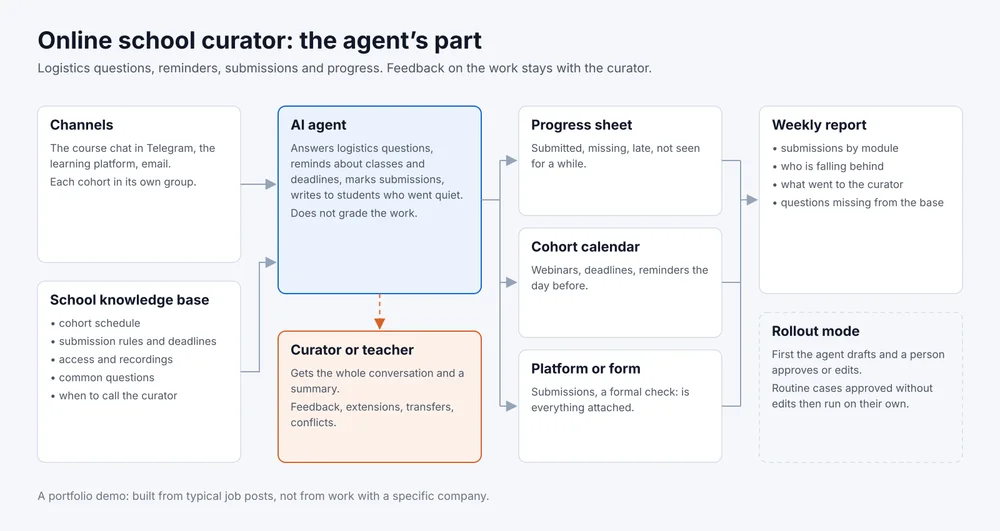
- Channels
- Course chat in Telegram, platform, email
- Tools
- Progress sheet, cohort calendar
- Goes to a person
- Feedback, extensions, conflicts
- Rollout
- Drafts for approval first
A portfolio demo. The scenario is built from typical job posts for an online school curator, not from work with a specific school. The dialogue below is written as a sample.
What the job post usually asks for
- answer students in the course chat about the schedule, access and assignments;
- remind them about webinars and submission deadlines;
- check who has handed in homework and keep the progress sheet;
- write to students who stopped studying;
- collect feedback after each module;
- pass questions about the material to the teacher.
What the agent takes and what stays with a person
How it works
The agent works in the course chat in Telegram or on the learning platform and answers from the school’s knowledge base: the schedule, links, submission rules, answers to common questions. Reminders about webinars and deadlines go out by the cohort calendar.
The agent sees submissions on the platform or in a form and updates the progress sheet once a day. It checks the work only formally: is everything attached and in the right format. It sends a short message to a student who has not logged in for a while, and if there is no reply, flags them for the curator.
Questions about the material, extension requests and any emotional message go to the curator with the whole conversation and a note on which lesson it concerns. The full map is the picture at the top of the page.
Sample script
Sample script, not a log of a real conversation
Student: I can't find the recording of yesterday's webinar.
Agent: It is on the platform under Module 3, recordings appear the day after the live session. Direct link: (link to the recording).
Student: Thanks. I won't manage to hand in the homework by Friday, can I do it later?
Agent: Under the course rules the Module 3 deadline is Friday, 11:59 pm. The curator decides on extensions, so I'm passing your request to them with this conversation.
Agent, to the curator: A student in the spring cohort asks to move the Module 3 deadline. Her earlier assignments were all on time. Conversation at the link.
Curator: Approved until Monday.
Agent: Told the student and set the new deadline in the progress sheet.
The curator made the call on the extension. The agent passed the request on, delivered the answer and updated the sheet.
What I need from you
- the job post or the curator’s task list;
- the cohort schedule, submission rules and deadlines;
- answers to students’ common questions, links to materials and recordings;
- access to the course chat, the platform or submission form and the progress sheet;
- which curator takes the questions the agent hands over, and in which hours.
How we roll it out
- I build the knowledge base and the agent’s instructions from the school’s materials and connect the chat, the platform and the progress sheet.
- The agent works in draft mode: the curator sees replies to students and reminders first, and approves or edits them. Every edit goes into the knowledge base.
- Routine replies and reminders the curator approved without edits, the agent sends without approval. Anything about grades, deadlines and student support still goes through a person.
- A weekly report arrives: submissions by module, who is falling behind, what went to the curator and which answers the base was missing.
Knowledge base template
A file with the sections the agent reads before it starts: the course and cohorts, the schedule, submission rules, common questions, reminder texts, what to hand to the curator. Filled in, it becomes a ready brief for an agent at your school.
Download: template for an online school, a Markdown file that opens in any text editor.