Marketplace seller operations assistant: what an AI agent takes
A typical operations assistant job post for a marketplace seller on Amazon, Ozon or similar: daily sheets and exports, tasks by instruction and an end-of-day summary. The agent takes the data gathering and the repeat tasks, and the seller or manager keeps the decisions.
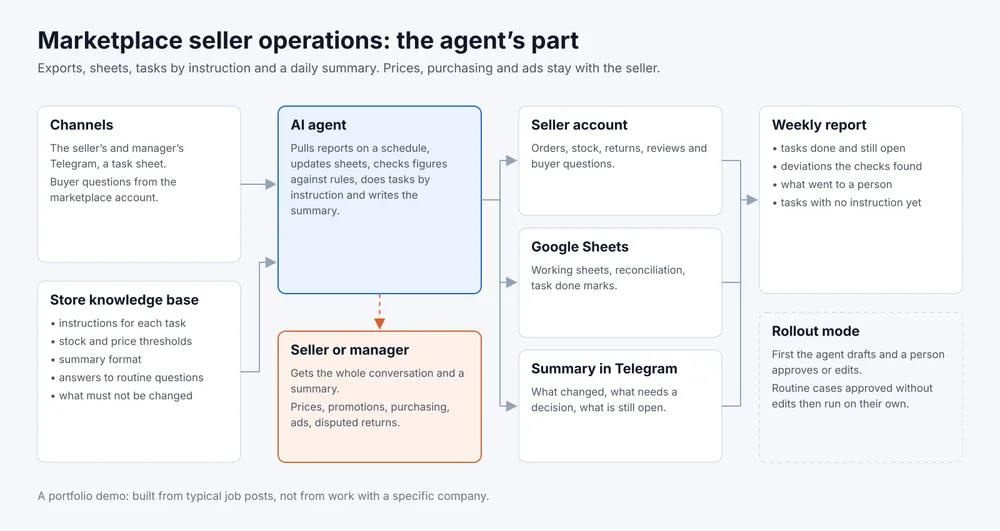
- Channels
- Telegram, task sheet, seller account
- Tools
- Marketplace seller account, Google Sheets
- Goes to a person
- Prices, promotions, purchasing, ads
- Rollout
- Drafts for approval first
A portfolio demo. The scenario is built from typical job posts for an operations assistant at marketplace sellers, not from work with a specific store. The dialogue below is written as a sample.
What the job post usually asks for
- pull reports from the seller account every day: orders, stock, returns;
- update the working sheets and reconcile the figures;
- do tasks by instruction: check listings, prepare a restock request, answer routine buyer questions;
- keep an eye on new reviews and questions;
- write the manager an end-of-day summary.
What the agent takes and what stays with a person
How it works
On a schedule the agent pulls reports from the seller account, through the marketplace’s official seller access or from exports that arrive by email, and updates Google Sheets. It checks the figures against rules you set: a stock threshold, an allowed price difference, a rise in returns for a product.
Tasks arrive in Telegram or in a task sheet, and each one has an instruction: in text, a voice message or a screen recording. The agent does the task and marks it done with a link to the result. In the morning it sends a summary: what changed, what needs a decision, which tasks are still open.
Anything outside the instructions the agent does not do. It writes to the manager in Telegram with what it noticed, why it did not act, and a link to the row in the sheet. The full map is the picture at the top of the page.
Sample script
Sample script, not a log of a real conversation
Agent, morning summary: Yesterday had fewer orders than the same day last week, with the drop in two products from the Kitchen category. Three products are below the stock threshold, the list is on the Stock tab. Seven new reviews: drafts are ready for five, two negative ones are waiting for you.
Manager: Prepare a restock request for the low stock from the template, but don't send it.
Agent: The draft request is in the Restock folder, quantities are based on two weeks of sales, as the instruction says. Please check it before it goes out.
Manager: Good. And check that the new listings have dimensions and weight filled in.
Agent: Checked against the instruction: two listings have no package weight, the links are in the task sheet. Shall I fix them in the account or leave them for you?
The restock request stayed a draft until the manager checks it. Two listing tasks are marked in the sheet and are waiting for the manager's answer.
What I need from you
- the job post or the list of daily tasks;
- access to the seller account with the permissions the tasks need;
- the current working sheets and the summary format you want to receive;
- instructions for repeat tasks, even as a voice message or a screen recording;
- the thresholds for the checks and a list of what the agent must not change.
How we roll it out
- I build the knowledge base and the agent’s instructions from your materials and connect the account, the sheets and Telegram.
- The agent works in draft mode: it updates the summary and the sheets, and shows the manager any action in the account and any buyer reply first. Every edit goes into the knowledge base.
- Tasks the manager approved without edits, the agent does without approval. New and unusual ones still go through a person.
- A weekly report arrives: tasks done and still open, deviations the checks found, what went to a person and which tasks have no instruction yet.
Agent instructions template
A file with the sections the agent reads before it starts: the store and its categories, reports and sheets, the check rules, task instructions, the summary format, what to hand to a person. Filled in, it becomes a ready brief for an agent at your store.
Download: template for a marketplace seller, a Markdown file that opens in any text editor.