Interior design studio assistant: what an AI agent takes
A typical design assistant job post: quotes from furniture and lighting suppliers, product schedules, contracts and estimates from templates, a meetings calendar and payment reminders. The agent takes the correspondence and the spreadsheets, and the designer keeps the choices and the conversations with the homeowner.
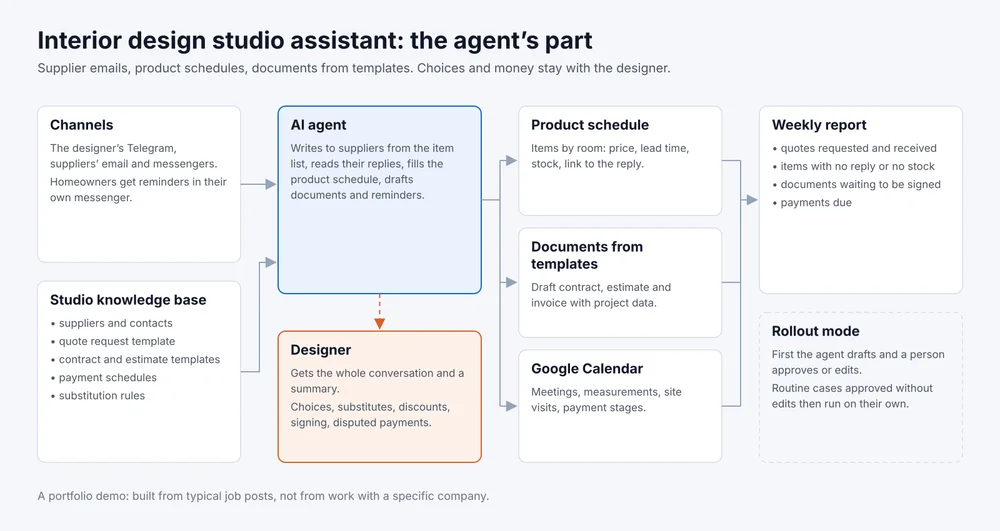
- Channels
- Telegram, email, suppliers' messengers
- Tools
- Google Sheets, Docs, Calendar
- Goes to a person
- Choices, substitutes, discounts, signing
- Rollout
- Drafts for approval first
A portfolio demo. The scenario is built from typical job posts for an assistant at an interior design studio, not from work with a specific studio. The dialogue below is written as a sample.
What the job post usually asks for
- ask furniture, lighting and finishes suppliers for prices, lead times and stock;
- collect the replies into a product schedule for each project;
- prepare contracts, estimates and invoices from the studio’s templates;
- keep the calendar of meetings, measurements and site visits;
- remind homeowners about payment stages;
- keep project folders and correspondence in order.
What the agent takes and what stays with a person
How it works
The designer sends the agent the item list for a project in Telegram or puts it in the sheet. The agent sends suppliers a request from the studio’s template, by email or messenger, reads the replies and enters the price, lead time and stock in the product schedule with a link to the email.
Contracts, estimates and invoices are assembled from the studio’s templates in Google Docs with data from the project record. Meetings and payment stages sit in Google Calendar, and before each payment the agent prepares a reminder to the homeowner that the designer can send with one tap.
If a supplier offers a substitute, a reply does not look like a price, or the homeowner disputes an amount, the agent does not decide. It writes to the designer in Telegram with the correspondence and a link to the row in the sheet. The full map is the picture at the top of the page.
Sample script
Sample script, not a log of a real conversation
Designer: Get quotes for the Park Flat project: the sofa from the mood board, two floor lamps and the pendant over the table. Delivery needs to be before the end of the month.
Agent: Sent requests to three suppliers from the list. I'll collect the replies in the product schedule, Living Room tab.
Agent, next day: Two suppliers replied, prices and lead times are in the sheet. The pendant is out of stock and the supplier offers a similar model, the link is on the item's row. Do we consider the substitute?
Designer: No, ask the other suppliers for that exact model.
Agent: Sent. Also a reminder: the homeowner's second payment under the contract is due tomorrow. The draft reminder is ready, shall I send it?
Designer: Send it.
Two rows in the product schedule were updated, and the pendant is marked "asking other suppliers". The payment reminder went out after the designer approved it.
What I need from you
- the job post or the assistant’s task list;
- the supplier list with contacts and how each one takes requests;
- contract, estimate and invoice templates, and a product schedule from a past project;
- payment schedules for current contracts;
- access to the calendar, the email used for requests and the project folders.
How we roll it out
- I build the knowledge base and the agent’s instructions from your templates and connect email, Telegram, the sheets and the calendar.
- The agent works in draft mode: the designer approves or edits every supplier email, document and reminder. Every edit goes into the knowledge base.
- Routine quote requests and schedule updates the designer approved without edits, the agent handles without approval. Documents and messages to homeowners still go through a person.
- A weekly report arrives: quotes requested and received, items with no reply or no stock, documents waiting to be signed and payments due.
Agent instructions template
A file with the sections the agent reads before it starts: suppliers, the quote request template, the product schedule layout, rules for documents and reminders, what to hand to the designer. Filled in, it becomes a ready brief for an agent at your studio.
Download: template for an interior design studio, a Markdown file that opens in any text editor.