Car service calculator with bookings to Telegram and a sheet
A calculator for a small car service: car size, set of jobs, parts, tyre storage and the day of the visit. No order goes through without a job picked, and the total updates on every click. A demo built for this portfolio; the company is made up.
Demo calculator, it runs on this page
Service booking, North Bay Garage
The company is made up, the price list is a placeholder and the total is shown in price-list units. The order goes nowhere: once you place it, the message for the staff bot and the row for the sheet appear below, exactly as Telegram and Google Sheets would receive them.
Message in the staff Telegram bot
The buttons under the message work: press one and the status changes in the message and in the sheet row. In the real setup n8n changes it.
Row in the orders sheet
| Created | Order | Name | Contact | Items | Total | Date | Status |
|---|---|---|---|---|---|---|---|
What the calculator sends to the n8n webhook
- What it counts
- Jobs and storage, car size and parts as factors
- Mechanics' bot
- Booking with Accept, Ask and Decline buttons
- Sheet
- One row per booking, status set by a button
- Stack
- Astro, JavaScript, n8n, Telegram, Google Sheets
-
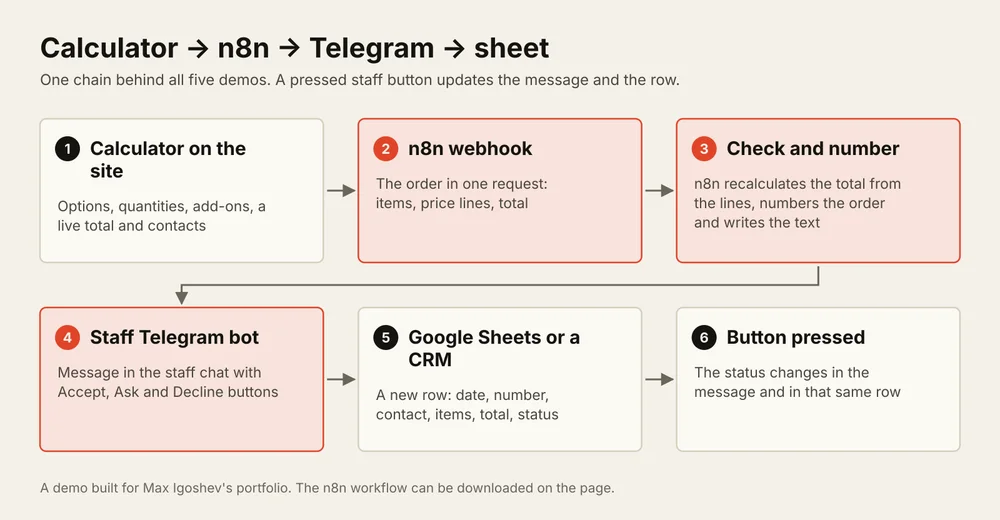
How it works: the calculator sends the booking to an n8n webhook, n8n checks the total against the price lines, posts a message with buttons to the mechanics' Telegram bot and appends a row to Google Sheets. A pressed button changes the status in that same row.
What it counts. Each job adds its own amount, and tyre storage is counted by the set. The car size and workshop-sourced parts multiply the total by a factor, and so does a weekend visit. Until at least one job is picked, the order button says what is missing, so the mechanics’ chat never gets an empty booking.
How it works. On “Place order” the calculator sends the car size, the chosen jobs, the price lines, the total and the contacts to an n8n webhook. n8n recalculates the total from the lines and flags the booking if it does not match, assigns a number and posts a message to the mechanics’ chat with Accept, Ask and Decline buttons. A row is then appended to Google Sheets. The service advisor presses Accept once the time is confirmed, and the status changes in the message and in the sheet row.
Download. The n8n workflow for this chain imports through Import from File. The Telegram and Google credentials are connected after the import. The last node can be swapped from Google Sheets to HubSpot, Pipedrive or Airtable.
This is a demo. The company, the price list and the bookings are made up; the calculator was built for this portfolio. Nothing is sent: the message and the row are shown as the bot and the sheet would receive them.
How I work. You send the prices for your jobs; I build the calculator and the chain on your n8n, Telegram and Google accounts, show it on test bookings and hand it over with a short guide. Communication in writing.