GetCourse payment: access, welcome sequence and a sheet row
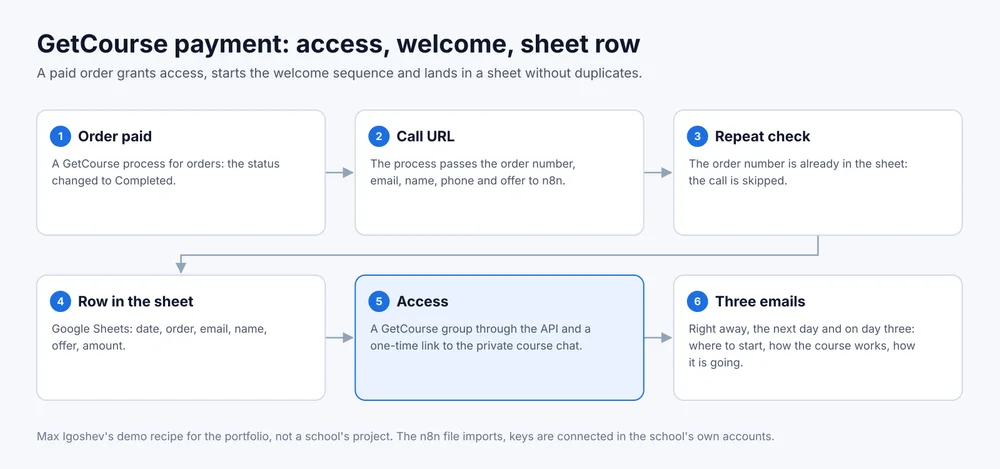
A paid GetCourse order grants access, sends a link to the private course chat, starts the welcome sequence and lands in a sheet. No manager involved and no duplicates when the call repeats.
- Input
- GetCourse process for orders
- Output
- Access, chat link, emails, a row
- n8n nodes
- 12 plus a setup note
- File
- school-getcourse-payment.json
The problem
Someone paid for the course, and from that moment everything depends on a curator: add them to a group, send the chat link, write a welcome, put the payment into the producer’s sheet. In the evening and at weekends this waits until morning, while the buyer wonders where the money went.
The chain step by step
- Order paid. GetCourse gets a process for orders with the condition “status: Completed”.
- Call URL. The process operation “Call URL” passes the order number, email, name, phone, offer and amount to n8n through order variables.
- Repeat check. If the order number is already in the sheet, the call is skipped. A process can fire twice, for example when someone changes the status by hand, and the second call duplicates nothing.
- Row in the sheet. Google Sheets gets the date, order, email, name, phone, offer and amount. The producer sees payments without access to GetCourse.
- Access. The user is added to a GetCourse group through the API, and the group opens the training or a bonus module. The bot creates a personal one-time link to the private course chat.
- Three emails. The first goes right away: access is open, here is the chat link. The second the next day: how the course works. The third on day three: how the first lessons are going.
What the school provides
Admin rights in GetCourse to create the process and an API key. The name of the group that opens access. A Telegram bot with admin rights in the private course chat. A mailbox for sending and a Google Sheet.
What the school gets
Access and the chat link arrive right after payment, at any hour. The curator stops copying payments by hand, and the producer has a sheet of payments that opens on a phone. The email texts live in n8n nodes and can be edited without a developer.
Where it breaks
If the school already sends emails inside GetCourse, emails from n8n duplicate them. Then step 6 goes, and joining the group in step 5 starts the GetCourse sequence instead. The buyer’s email has to match the one in GetCourse, otherwise the group lands on a different user.
The n8n file
Download school-getcourse-payment.json. Import: Workflows, Import from File. The note inside the file has a ready line for the “Call URL” operation with every order variable. Keys in the file are empty.
This is a demo. The recipe was built for the portfolio and has not run for a school yet.