Tilda or Taplink form to an amoCRM deal with its source
Every request from the website becomes an amoCRM deal carrying its ad tags, and the manager hears about it in Telegram and sees right away which campaign the person came from.
- Input
- Tilda or Taplink form
- Output
- amoCRM deal, Telegram message
- n8n nodes
- 8 plus a setup note
- File
- school-form-to-crm.json
The problem
The website form sends a request to an inbox or a Telegram chat, and a manager copies it into amoCRM by hand. Some requests get lost on the way, and the source never reaches the deal at all. A month later nobody can answer which ads bring requests.
The chain step by step
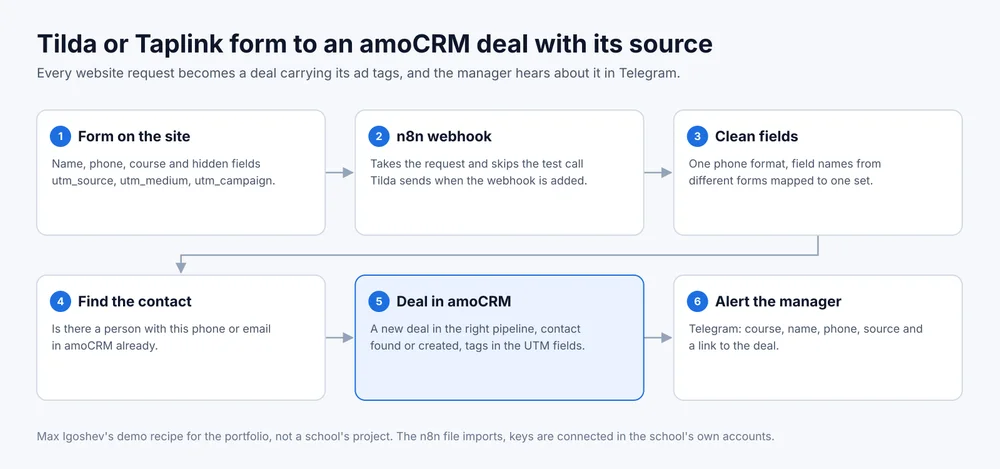
- Form on the site. The Tilda or Taplink form has name, phone, course and hidden fields utm_source, utm_medium, utm_campaign, utm_content, utm_term, filled from the page address.
- n8n webhook. Tilda and Taplink send the request to the webhook address. The test call Tilda sends when the webhook is added is skipped.
- Clean fields. The phone goes into one format and field names from different forms map to one set, so a second form on another page does not break the chain.
- Find the contact. The workflow looks for a person with this phone or email in amoCRM so duplicates do not pile up.
- Deal in amoCRM. If the contact exists, the deal is linked to it; if not, the deal and the contact are created in one request. The tags go into the deal’s standard UTM fields, so they show in the card and in amoCRM reports.
- Alert the manager. The team’s Telegram chat gets the course, name, phone, source with campaign and a link to the deal.
What the school provides
Access to the form editor on Tilda or Taplink. A long-lived amoCRM token from the integrations section and the pipeline ID if it is not the main one. A Telegram bot and the managers’ chat. An n8n server, self-hosted or cloud.
What the school gets
Every request lands in amoCRM with its source and without manual copying. The manager learns about it in Telegram and opens the deal from the link. amoCRM reports get a breakdown by tag that shows which campaigns bring requests.
Where it breaks
Tags arrive only if the ad leads to a page with them in the address. A person who came from an ad, left and came back directly a week later arrives without tags. The fix is keeping the tags in a cookie on the first visit, more on the page for online schools.
The n8n file
Download school-form-to-crm.json. Import: Workflows, Import from File. Inside is a setup note: where to paste the webhook address, how to add the amoCRM token and the chat ID. Keys in the file are empty.
This is a demo. The recipe was built for the portfolio and has not run for a school yet.