Traffic-source tags in a Telegram bot funnel
Each channel gets its own link to the bot: ads, Reels, a post in the Telegram channel, every partner. The tag is saved on the first start, goes to a sheet or the CRM, and every Monday a report shows which channel brought people and who of them paid.
- Works in
- Any bot builder or your own bot
- Output
- Tag in a sheet or CRM, a report
- n8n nodes
- 15 in three branches
- File
- school-bot-source-tags.json
The problem
The school sends people to the bot from ads, from Reels, from its own Telegram channel and through partners. Everyone arrives through the same link, so all the bot shows is that a person pressed Start. Nobody knows how many people each channel brought or who of them paid, and the ad budget and partner payouts are split by guesswork.
The chain step by step
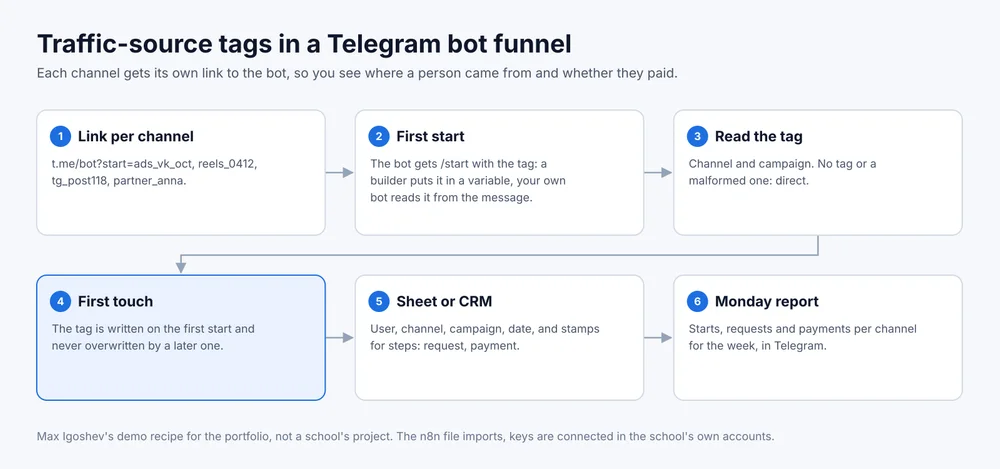
- Link per channel. Each channel gets a link like t.me/bot_name?start=tag: ads_vk_oct for an ad, reels_0412 for a video, tg_post118 for a channel post, partner_anna for a partner. A tag may hold Latin letters, digits, underscore and hyphen, up to 64 characters: that is Telegram’s limit.
- First start. Pressing Start sends the bot the /start command with the tag. Any bot builder or your own bot can read it: a builder stores it in a variable and posts it to n8n, your own bot reads it straight from the message.
- Read the tag. The part before the first underscore becomes the channel, the rest the campaign. No tag or a malformed one: the channel is recorded as direct.
- First touch. The tag is written on the first start and never overwritten. If the person later comes through another link, that one is kept separately as the latest, and the first source stays.
- Sheet or CRM. The user’s row holds channel, campaign, first start date and stamps for funnel steps: left a request, paid. The builder or your own bot reports a step with a separate request. The same step can create an amoCRM deal with the tag in its UTM fields; that node ships disabled and turns on with one click.
- Monday report. Telegram gets starts, requests and payments per channel for the week, plus starts the week before.
What the school provides
A list of channels and partners that need links. Access to the bot builder to set up sending the tag and the steps, or your own bot’s token. A Google Sheet or access to amoCRM. A chat for the report.
What the school gets
An answer to how many people and payments each channel brought, without counting by hand. Partners can be shown their numbers. Ads that bring people but no payments are visible after the first week.
Where it breaks
The tag lives only in the link. A person who found the bot through Telegram search, or got a forwarded link without a tag, lands in direct. Reels links belong in the profile description or a pinned comment, and different videos need different links, otherwise they merge into one channel.
The n8n file
Download school-bot-source-tags.json. Import: Workflows, Import from File. It has two entry points: one for your own bot and one for a request from a builder. Keys in the file are empty.
This is a demo. The recipe was built for the portfolio and has not run for a school yet.