Roblox game UI for mobile and PC
HUD, menus and first-run tips for Roblox games, built and wired up in Roblox Studio. One interface that adapts to touch screens and keyboards, so mobile players are not an afterthought.
HUD and skill bars
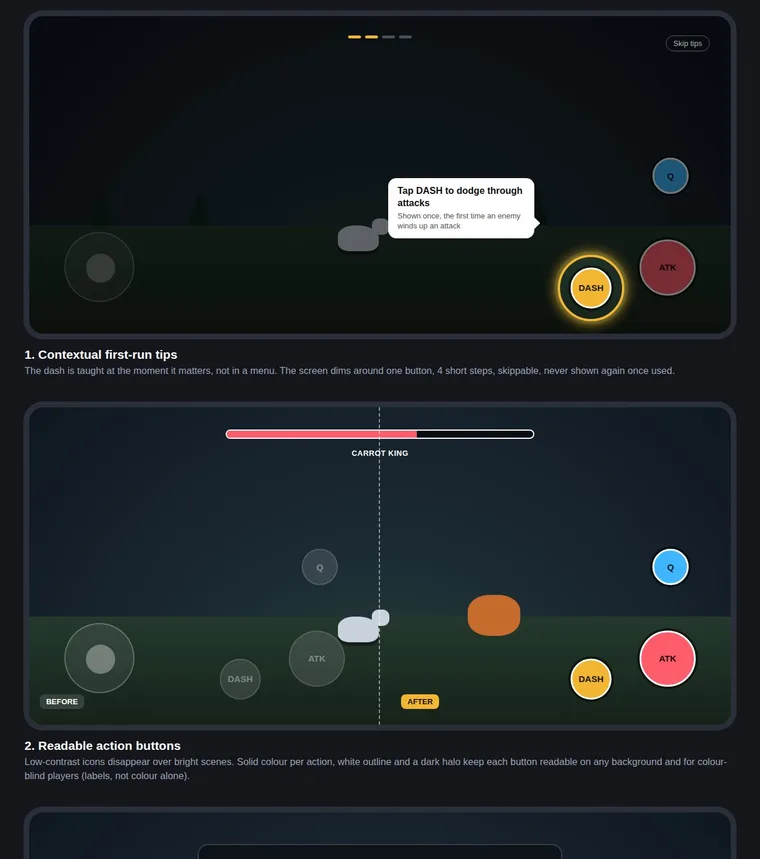
Health, mana, quest tracker and skill buttons that stay readable over bright scenes, with clear locked and cooldown states.
Mobile and PC from one layout
Thumb-zone layout on touch screens, key labels on PC, switched automatically by input type.
Onboarding and first-run tips
Teach a mechanic at the moment it matters, dim the rest of the screen, show it once and let players skip.
Implemented in Studio
Built in Roblox Studio with Luau and checked in play mode, not just a picture of a screen.
How we start
You tell me which screens matter most. I build a small working piece first in a separate place, so you can play it and judge it before giving any access to your game. Communication is in writing, in your time zone.