Readymag: final polish and responsive QA
I finish a nearly done Readymag site so it holds up on desktop, tablet and phone, without redesigning it. Below is a sample QA pass on my own site: what I found, what I changed, and before and after screenshots. Your project gets the same checklist in the Readymag editor.

- Layouts
- Desktop, tablet, phone
- Way of working
- Hourly, scope agreed first
- Access
- Collaborator in your project
- You get
- Report with before and after
-
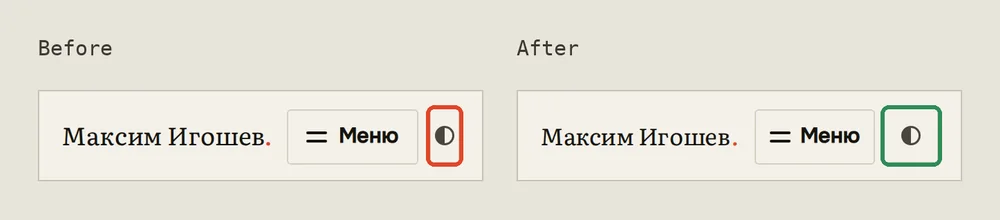
1. Russian header at 320 px. Before: the theme switch was squeezed to 23 px wide against the edge of the screen. After: the buttons keep their 40 px, and on screens under 360 px the name and the gaps give way instead.
-
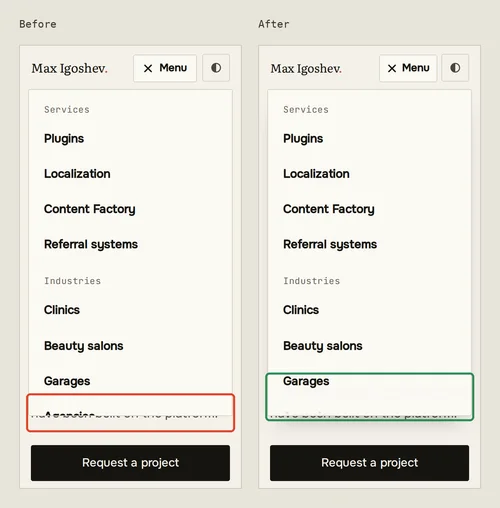
2. Menu at 320 px. Before: the list was cut mid-item at the bottom of the panel, with nothing to say it scrolls. After: the bottom of the list fades out while there is more below, and the menu closes on Escape or a tap outside it.
-
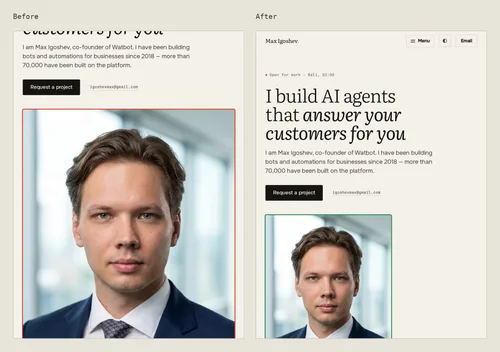
4. Tablet at 768 px. Before: the portrait filled the width and more than a screen of height, from a file too small for a 2x screen. After: it is capped at 420 px, so the file is sharp and the photo no longer takes more than a screen.
-
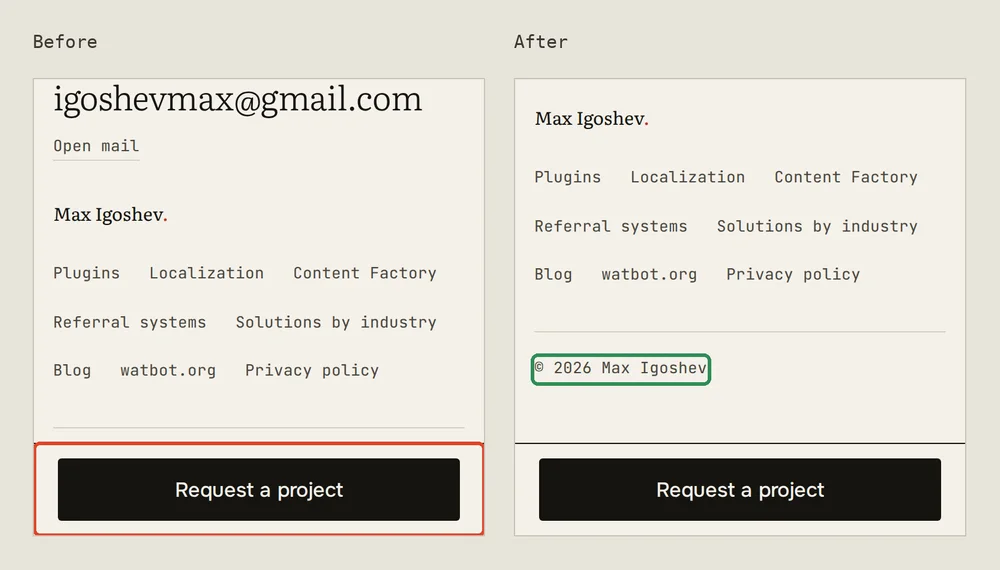
3. End of an inner page at 375 px. Before: the floating “Request a project” bar covered the last line of the footer. After: the page leaves room for the bar, so the footer ends above it.
-
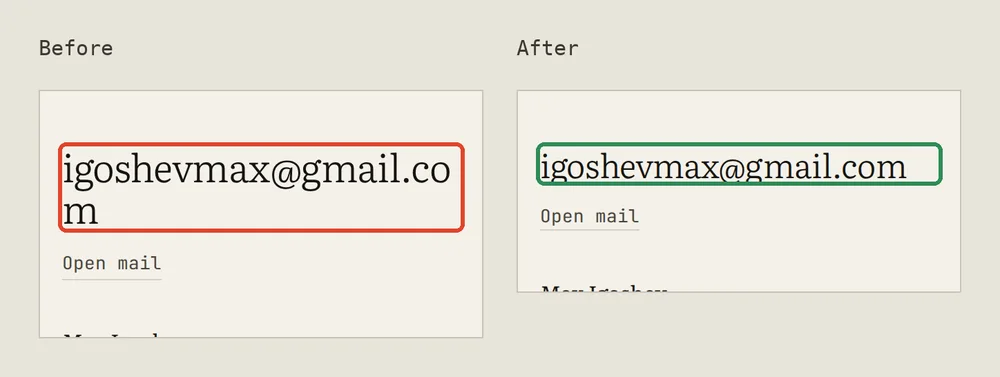
6. Footer at 320 px. Before: the large e-mail address broke before its last letter. After: on screens under 360 px it is set a little smaller and fits on one line, and if it ever has to wrap, it wraps after the @.
-
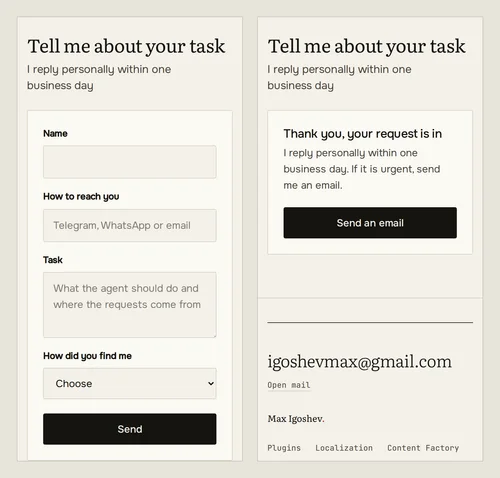
Form at 375 px, passed before and after: filled in, then the thank-you message that replaces the form and stays in view. The request was intercepted in the browser, so nothing was sent.
Sample QA pass on my own site: found, then fixed
I have not done Readymag work for clients yet, so instead of a case this page shows the method on a site I can change: my own, igoshevmax.com. In October 2026 I checked six pages in English and Russian at 320, 375, 414, 768 and 1280 px, with a headless browser measuring every element and every screenshot checked by eye. Then I fixed what it found, rebuilt the site and ran the same checks again, on eight pages this time. My site is built in code, not in Readymag, but the things that go wrong across screen sizes are the same, and so is the order of work: record, fix, check again.
Found and fixed
- Header on a 320 px phone. Was: in the Russian version the longer name and “Меню” squeezed the theme switch to 23 px wide. Changed: the buttons no longer shrink; on screens under 360 px the gaps are a little tighter and the name a size smaller.
- Menu on phones. Was: on a short screen the list was cut mid-item with no hint that it scrolls, and the menu stayed open after Escape or a tap outside it. Changed: the bottom of the list fades out while there is more to scroll, the panel gets a soft edge, and Escape or a tap outside closes it.
- Floating button at the end of a page. Was: on phones the fixed “Request a project” bar covered the last line of the footer. Changed: pages that have the bar leave room for it at the bottom.
- Portrait on a tablet. Was: the home portrait filled the whole width, more than a screen tall, and the file was about half the resolution a 2x tablet needs. Changed: below the two-column layout the portrait is capped at 420 px, and the image tells the browser so.
- Images on wider screens. Was: on portfolio pages the images told the browser they would be 760 or 1,000 px wide while the column is 1,120 px, so the browser loaded a smaller file and stretched it. Changed: the size hints now match the real column, so a larger file is loaded. One source image is itself 1,086 px wide, so on a 2x tablet it is still a little under ideal; that needs a larger original, not code.
- E-mail address in the footer. Was: at 320 px it broke before its last letter. Changed: it is a size smaller on screens under 360 px and, if it has to wrap, breaks after the @.
- Small tap targets. Was: the “Open mail” link and the e-mail link next to the main button were 22 px tall, below the 24 px minimum in WCAG 2.2. Changed: both are now 45 px tall and look the same as before.
Not in this pass: the share preview image is the same on every page, a few page descriptions are longer than search results show, and one data request needs a server setting. These are content and hosting tasks rather than layout fixes.
Checked again after the fixes
- No sideways scrolling at any of the tested widths, from 320 to 1280 px, on all eight pages, this one included.
- No text smaller than 12 px; form fields are 16 px, so iPhones do not zoom in when you tap them.
- Form: an empty submit is stopped and the cursor moves to the first empty field; a filled-in submit shows the thank-you message in place of the form.
- All 70 internal links on the tested pages open without errors.
- One main heading per page, canonical address and language versions in place.
On your project the report looks the same: each issue with the layout it is on, a screenshot before, what I changed, and a screenshot after.
What I check on your Readymag site
- Each layout separately. Desktop, tablet and phone, page by page: elements that overlap, run off the edge or sit out of line, and widgets that look fine in one layout and broken in another.
- Typography. The type scale on each layout, line breaks in headings, lone words on the last line, line length and spacing.
- Spacing. One rhythm between sections and inside blocks, so the phone layout does not feel like a squeezed desktop.
- Navigation. Menu on every layout, anchors that land in the right place, fixed elements that do not cover content, links that go where they should.
- Animations and triggers. Scroll and click animations that start at the right moment, do not jump, and stay smooth on a mid-range phone.
- Forms. Fields, required marks, error and success messages, and a test entry that actually reaches your inbox or connected service.
- Images and video. Crop on each layout, sharpness on high-density screens and file weight.
- Speed basics. Heavy files, fonts and embeds that slow the first screen.
- Search and sharing. Page titles, descriptions and the preview image that shows when someone shares a link.
How it works
- You send the project link. I look at the published site on a phone, a tablet and a desktop and tell you what I see.
- We agree the scope and an estimate of hours. The turnaround depends on the number of pages and is agreed after this first look.
- You invite me as a collaborator in Readymag. I record the issues per layout with screenshots before changing anything.
- I make the fixes in the editor, staying inside the existing design: no new styles, no rebuilt sections.
- You get a report with before and after for each item and approve the result before anything is published.